Excise PDF

Reading

Permanently removing text from a PDF.

“Permanently” is doing a lot of work in that sentence, so this page ends by saying exactly what it can and cannot mean. First, the procedure — which is six steps, and the last one is the only one most tools skip.

The six steps

  1. Open the document. Nothing is uploaded; the app has no network access at all. If a page has no text layer, you are told which pages, and the document is refused rather than processed as if it had been handled.
  2. Say what has to go. A rule is text plus a replacement, with whole-word and case-insensitive matching on by default and regex off — defaults chosen for redaction rather than for editing. For anything a rule cannot name — a signature, a stamp, a column — drag a rectangle over it instead.
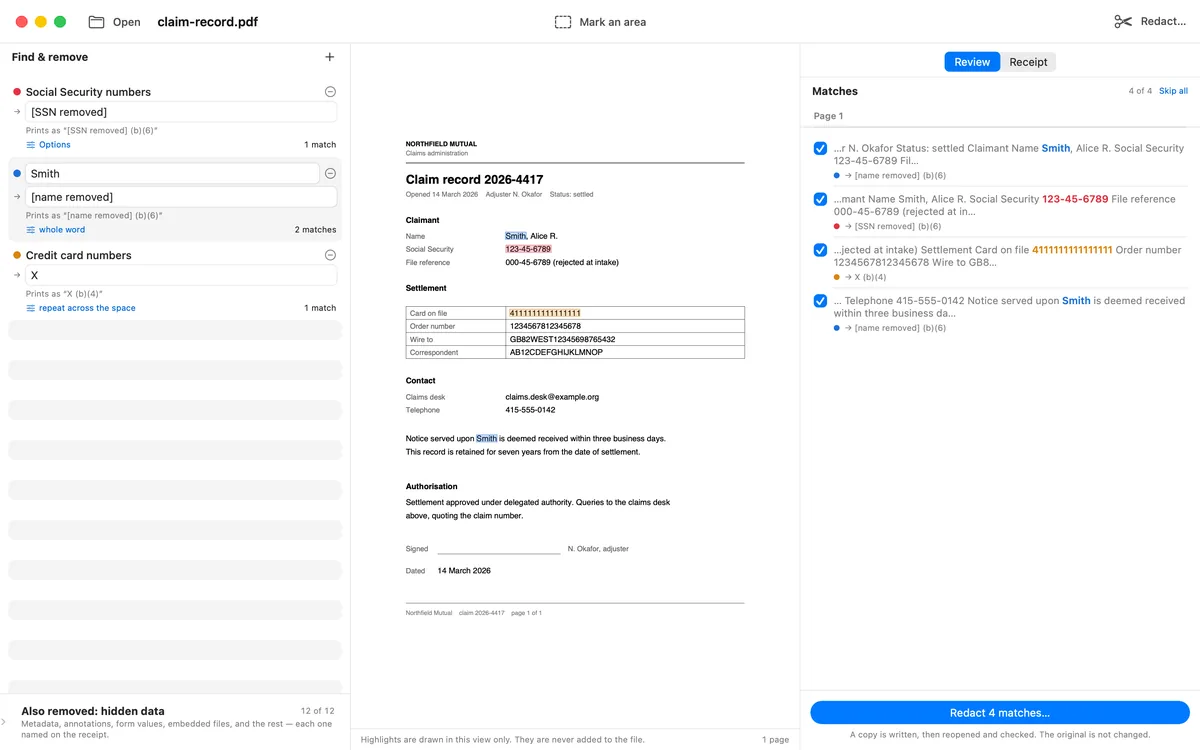
  3. Review every match in its own sentence. “Smith” alone is a decision nobody can make; held by Smith, hereafter is one they can. Uncheck what should stay. If the document's matches change between your review and the run, the run refuses rather than apply something nobody looked at.
  4. Decide what else leaves. Twelve hidden-data categories are removed by default, from document info and XMP metadata through form field values, bookmark titles, and page thumbnails. Text on the page is only half of what a PDF knows about a person.
  5. Run it. The page's content stream is rebuilt without the matched characters — they are removed, not covered — the object graph is sanitized, and the result is written to a separate file. The app refuses to write over your input, so the original is still the original.
  6. Read the receipt. The written file is reopened and read back: every page re-extracted, every object in the document graph walked, and every rectangle you drew re-read at its own coordinates. The report comes out of those bytes rather than out of what the run believed it did.
Rules in the sidebar with their replacements and exemption codes, the document in the middle, and every match listed on the right in the sentence it appears in.

Step 3, which is the one that decides whether the rest was worth doing.

What “permanently” means here — and what it does not

The claim is mechanical and narrow on purpose:

The claim

The matched characters are removed from the page's content stream; the object graph is sanitized of the categories you chose; the output is reopened and reported on. A mark drawn over a cleared area is a page object rather than an annotation, so there is nothing to peel off.

Not the claim: that a redacted file cannot be recovered by any means whatsoever. That is not something this app measured, so it is not something this app says. What it measured is on the receipt, and the receipt names its own limits.

Two limits belong right here, in the same breath as the procedure. A page nothing could read stays unchecked and keeps the document from passing — including a page you asked OCR to read and it found nothing on, because a blank sheet and a scan too poor to read look identical from the inside. And the verifier does not search inside embedded file streams: an attachment is removed whole or kept whole.

Scanned pages

A page that is a picture of text has nothing to find and nothing to remove, so it stops its document by name. Ask for OCR and the page is read with Vision, on device, what your rules match is painted, and the result is flattened into the image — so on a scan there is no text underneath to peel off either. Language correction is deliberately off: correction rewrites what it read toward words the model prefers, which is exactly how an unusual surname becomes a common one, and a name corrected away is a name never redacted.

Where each platform stops

The Mac window has rules, page, review list and receipt side by side, plus batch mode over a folder. The iPad has the full review, drawn with a finger. The iPhone and the share extension list every match before anything is written — and say plainly that a phone has no place to uncheck one. The platforms section states that reduction in the app's own words.

One purchase covers Mac, iPhone and iPad. Pricing is on the home page.

See launch details

Read next