Questions

Everything people ask, answered plainly.

Each answer is deep-linkable, and each one states the limit as well as the capability.

Is the text really gone, or just covered? +

Gone from the page's content stream. Excise PDF rebuilds the page so the matched characters are no longer in it, rather than drawing a rectangle on top of them — and the mark it draws afterwards is a page object, never an annotation, because an annotation can be deleted.

Then the file that was written is reopened and read back, and what that read finds is what the receipt reports. What the app does not claim is that no forensic route of any kind exists: the claim is the specific, mechanical one, and the receipt is the evidence for it.

What does the receipt actually check — and what can it not check? +

Two channels. One re-extracts the text of every page from the written file. The other walks every object in the document graph — form values, bookmark titles, document info, name trees — and reads every string in it. Split on that line the two have no overlap and no gap, and the receipt states the scope it inspected before it states what it found.

It cannot check what nothing could read. A page with no text layer, or a match you left unchecked, leaves a question unanswered — and an unanswered question keeps the document from passing. It also does not look inside embedded file streams: an attachment is removed whole or kept whole.

Does it work on scanned documents? +

A document containing a page with no text layer is refused by default, and the refusal names the pages — “pages 4 and 9 have no text layer” is something you can act on, and “this document contains scanned pages” is not.

Ask for OCR and those pages are read with Vision, on device: what your rules match is painted over and flattened into the page image. OCR is the weaker answer and is reported that way. A rule only ever sees one recognised region, so a name broken across two lines is not matched; the flattened page is resampled to 144 DPI by default, so a 300 DPI scan comes out softer; and OCR matches are not reviewable one by one.

Does anything leave my Mac or my phone? +

No. No target requests a network entitlement and none links a networking framework, so there is nothing to switch off and no traffic to take our word about. No account, no sync, no server, and the App Store privacy label is Data Not Collected.

Can I redact a whole folder at once? +

On the Mac, yes. Point batch mode at a folder and it runs your saved rules over every PDF directly inside it, producing one combined receipt on which every input gets a line — including the ones that were refused and the ones that failed. The headline counts verified, not written.

And here is what batch mode does not review, in its own words: “Rules were reviewed once, for the folder. Individual matches were not reviewed one by one — every match the rules found was applied.” It also takes no areas, is not recursive, skips files that are already redacted output, and has OCR off by default.

Does it change my original file? +

Never. Output is always a separate <name>.redacted.pdf, and the pipeline refuses outright to write over its input. There is no undo for a redaction, which is exactly why.

On the Mac you choose where the copy goes in the save panel. On iPhone and iPad the copy is written inside the app and handed to the export sheet, and the screen says plainly that it is not saved anywhere until you save it.

What are the auto-detectors, and will they find everything? +

Six: Social Security numbers, credit card numbers, IBANs, email addresses, phone numbers, and dates. Each is a pattern plus a structural check — Luhn for cards, ISO 13616 mod-97 for IBANs, the SSA's rules for Social Security numbers — so an order number is not offered as a credit card. Dates are off by default because they match every letterhead.

No, they will not find everything, and they are not meant to. Six detectors will not find a name, a case number or an address; that is what rules and rectangles are for. Auto-detect proposes rules and never edits, and its sweep runs once, when the document opens.

Can I redact something no rule can name — a signature, a stamp? +

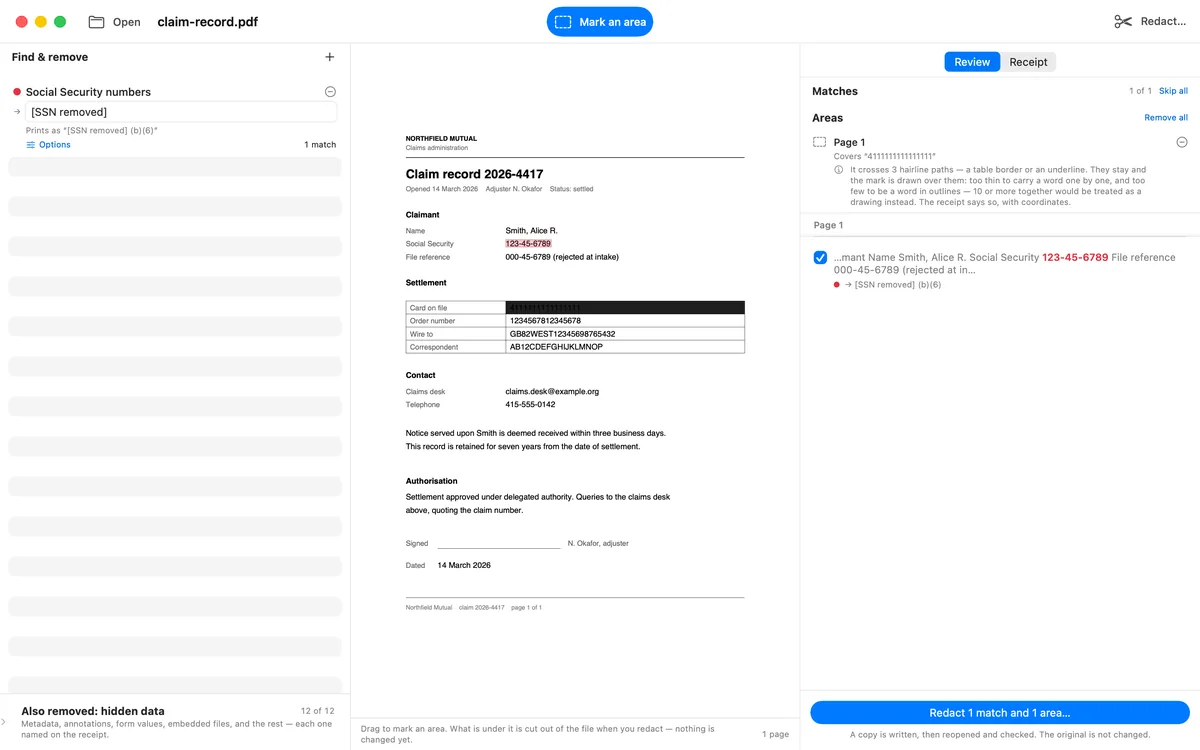
Yes. Drag a rectangle over it. Any overlap at all removes the character, so the app names what the rectangle covers before the run, while it can still be moved. Afterwards it returns to those coordinates in the written file and reads what is still drawn there; anything at all is a finding.

What may stay under a mark is decided by measurement. A hairline table border may stay, and the receipt discloses it with its coordinates on a run that otherwise passed — “left in place: 1 decorative border under the area on page 3, at 72.0, 700.0, 300.0 × 0.4 pt … it is still in the file.” An image never may, and neither does a fat vector: pixels are exactly the thing that holds a face, a signature, or a scanned page of text.

The limits: an area over an image removes nothing — it is reported as an obstruction and no mark is drawn, because a black box over a picture still in the document is the painting-over failure with the arrow reversed. A rectangle belongs to the page its drag began on. There is no move or resize; drawing it again is how you adjust it. And batch mode takes no areas.

A rectangle drawn across a table row before the run. The Areas panel names the text the rectangle covers and warns that it crosses three hairline rules, which stay and are drawn over, with the receipt recording their coordinates.

Before the run: what the rectangle covers, and what crossing it will leave behind — said while the rectangle can still be moved.

Can I print a FOIA exemption code? +

Yes. A rule can carry a code — a (b)(6), a case reference — and it is printed with the replacement on the page itself, not kept as a note about it, so a reader of the redacted document can see which exemption was claimed where. The receipt tallies them.

Codes are counted on stamps rather than on applications: a match that a rectangle had already cut out printed no code, and counting it would claim an exemption that is not on the page anywhere. The app does not know whether the exemption you claimed is the correct one.

Does it run on Windows? +

No. Excise PDF is for Mac, iPhone, and iPad. The minimum iOS and iPadOS versions will be posted before the App Store launch; the compatibility work is not final yet. There is no Windows version, no Linux version, and no web version.

Is there a command-line version or an API? +

No. There is no CLI, no scriptable interface, no server, no API, no watched folders, and no scheduling. Batch mode is a folder you pick and press a button on.

What does it cost? +

One purchase, three platforms — the Mac app and the iPhone/iPad app are the same product, so buying it once will cover all three. The planned launch price is $9.99 and the planned standard price is $19.99. The listing is not public yet; Apple will be the seller and its local storefront figure will become the price of record.

Is this legal advice? +

No. Excise PDF is a document tool. It does not know what must be redacted in your matter, whether an exemption you claimed applies, or whether a production is complete. It reports what it inspected in one file, under the settings of that run, and it certifies nothing.